How to Use Nonce for Bulk ASIC Miner Management: A Large-Scale Bitcoin Mining Ops Guide
Bulk ASIC management for large Bitcoin farms means discovering devices, filtering anomalies, running reboot/power/pool/firmware actions in batch, then automating repeats and verifying recovery—not logging into each miner IP.
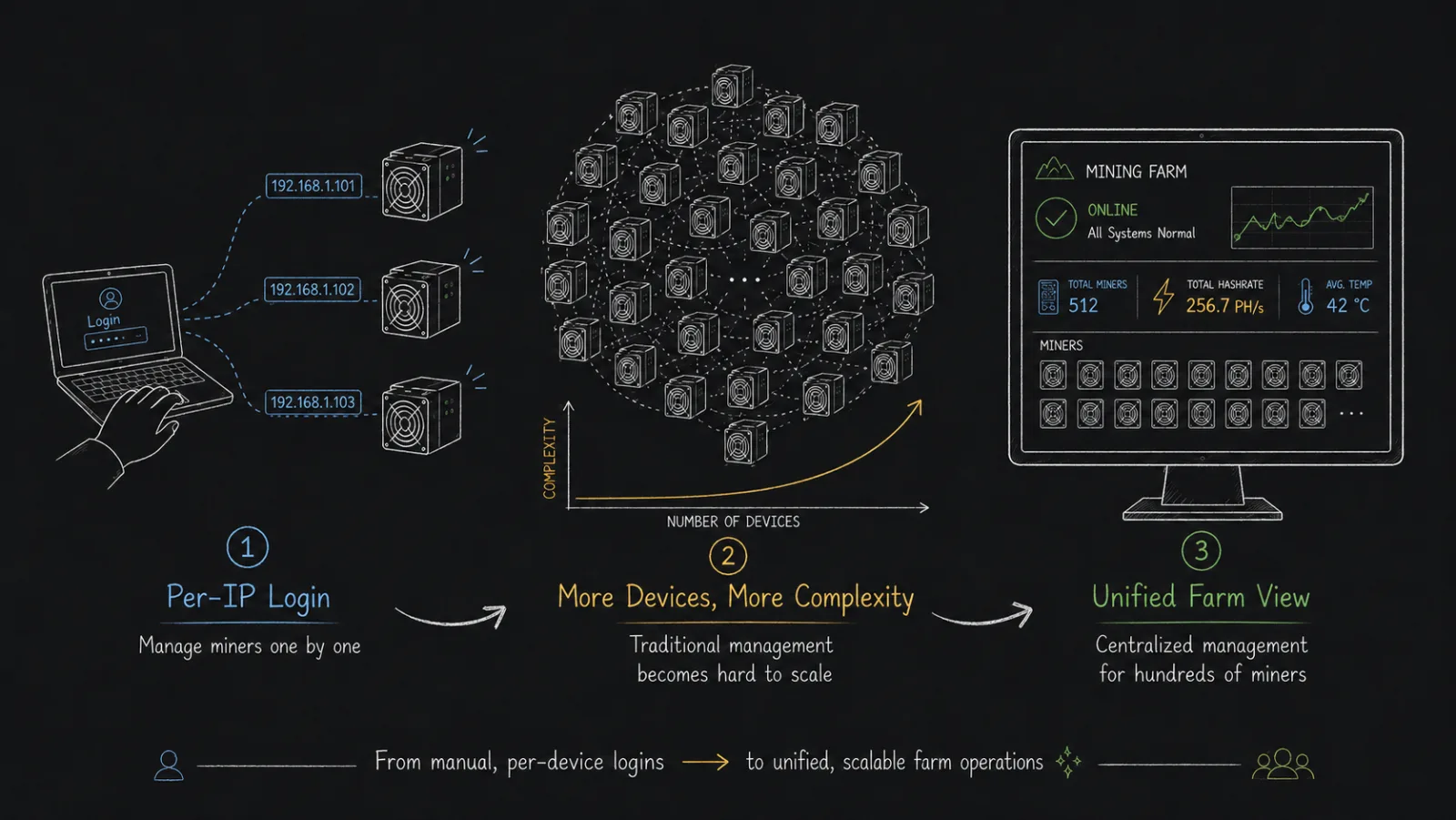
When a Bitcoin mining farm has only a few ASIC miners, operators can remember each device's IP address, log into each miner's web interface one by one to check hashrate, temperature, and pool settings, then reboot individually when something goes wrong. But once miner counts grow from dozens to hundreds or more—and span different racks, zones, and sites—this approach quickly hits a wall: abnormal miners are hard to catch in time, the same action must be repeated over and over, pool configs drift out of sync, overclocking and underclocking are hard to unify, high-temperature and low-hashrate issues depend on manual walkthroughs, and after a shift handoff it is hard to confirm which devices the previous shift actually handled.
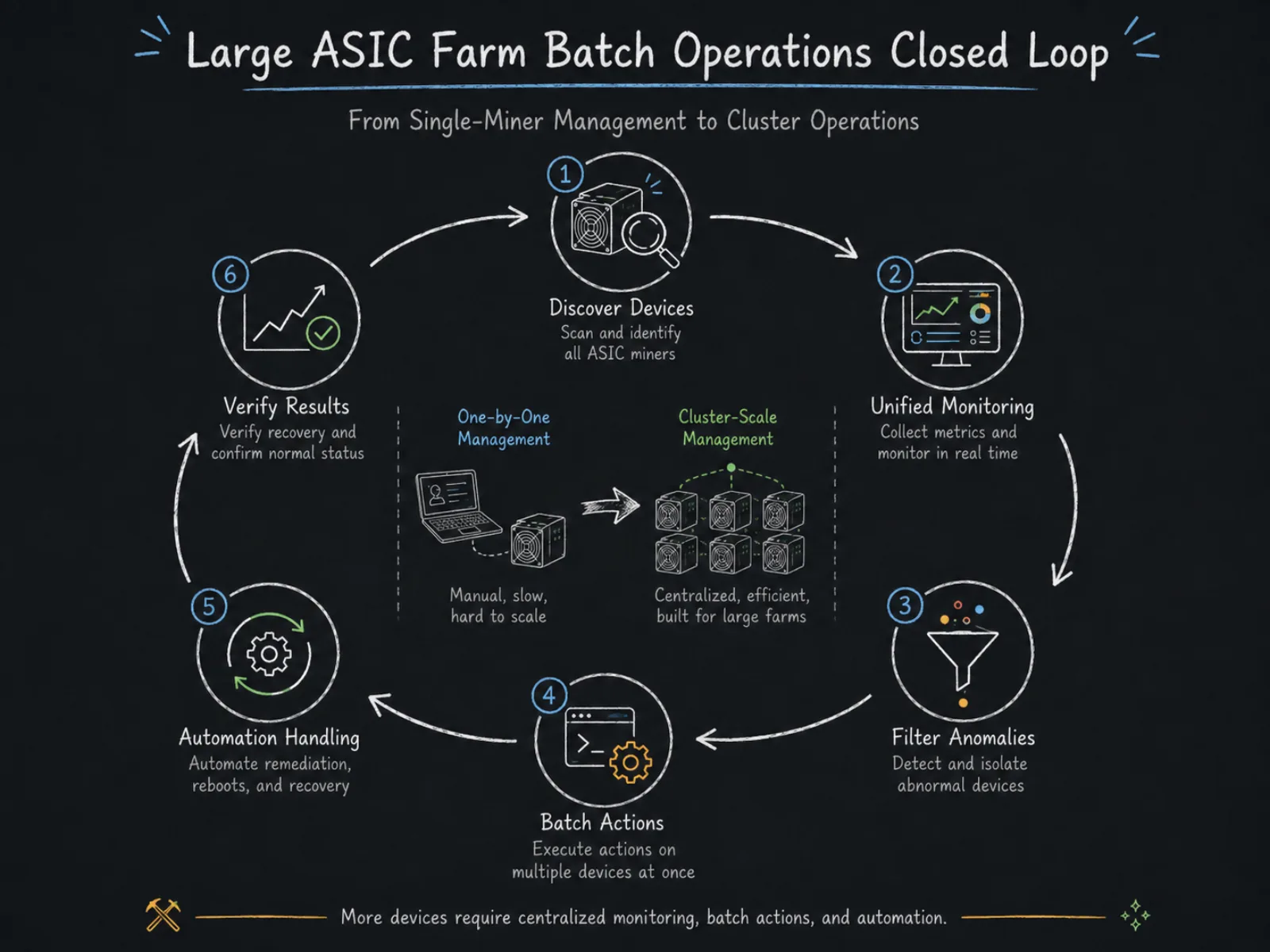
So the core problem for large Bitcoin farms is no longer "how to control one miner," but "how to manage a large fleet of ASIC miners as a single device cluster." Nonce's farm management logic is built around exactly that need: first discover and continuously monitor miners, then use conditional filters to find devices that need action, then run bulk operations, and further hand recurring low-hashrate and high-temperature scenarios to automation rules. The full ops loop can be summarized as: discover devices → monitor status → filter anomalies → bulk handle → auto recover → verify results.
Why Large Farms Cannot Keep Relying on Per-IP Miner Management
ASIC miners themselves usually already provide a web management interface. Take Antminer as an example: Bitmain's miner UI can show device status, hashrate, pools, firmware, network, hashboards, and fans, and can also reboot, change pools, and upgrade firmware. The S21 user manual likewise shows configuration items such as pool address, worker name, and work mode. In other words, for a single miner, logging into the device IP and completing maintenance is not hard.
The problem appears after device count grows. Suppose operators need to handle a batch of low-hashrate miners. With the traditional approach, they must first confirm which miners are abnormal from monitoring data, then find each device's IP, then log in one by one, inspect data, reboot, and finally re-check whether recovery succeeded. Changing pools, adjusting operating mode, or upgrading firmware repeats a similar process. What truly burns labor is not any single click, but the endless loop of "find device — confirm status — execute action — verify result."
The role of farm management software is to add a cluster management layer on top of each miner's own management capability. Miners still run and compute; the platform aggregates data from large fleets so operators can find devices by farm, IP, model, runtime status, temperature, and hashrate, and send the same management action to a batch of target miners.
That is also why bulk management cannot be simplified to "controlling many miners with one click." Truly effective bulk ops must solve three problems at once: select the right miners, run the correct action, and confirm the result. Without accurate filtering, bulk actions can amplify human error; without post-action verification, operators still have to re-check machine by machine.
Step 1: Bring Miners into a Unified Device Management Scope
Before using Nonce for bulk ASIC management, you first need a farm device view. A typical onboarding flow is: create a workspace and farm, deploy a Nonce Agent inside the farm network, then configure the IP ranges to scan. The Agent searches for miners in the specified network range, reads miner info after discovery and uploads it to the platform, then continues background data refresh so miner status stays up to date.
Nonce supports both manual and automatic scanning. When deploying a new batch of miners, you can manually scan the corresponding IP ranges; for long-running farms, you can save the segments that need scanning and let the system re-scan periodically. That way, new devices that later join the network can still be discovered without operators constantly rebuilding the device inventory.
For large farms, IP ranges should also map to physical infrastructure. For example, different racks, containers, sheds, or network zones should use clear subnet planning. Device management then is not just seeing an IP address—it can further answer "where are these abnormal miners located" and "are they concentrated on the same rack or network zone." When an entire block of devices goes offline at once, that structure matters especially, because the issue may come from a switch, power, or zone network—not dozens of miners failing independently at the same moment.
Nonce's current supported miner models list continuously updates support across vendors, models, and firmware, so before importing devices at scale you should confirm that actual miner models and firmware versions are within the current support range.
Step 2: Do Not Act on Miners First—Filter the Ones That Are Actually Problematic
The most important bulk-management capability is not "select all," but "precise selection."
If a farm with a large ASIC fleet sees hashrate drop, bulk-rebooting every miner is usually not a reasonable response. A better flow is to first filter abnormal devices out from healthy miners, then decide the next action by fault type. Nonce's miner filters can find miners by runtime status, temperature, hashrate, and combined conditions—for example offline miners, zero-hashrate miners, low-hashrate miners, or overheating devices—and further narrow the scope with additional conditions.
This step effectively sets the ceiling for large-farm ops efficiency. Different anomalies need entirely different handling: zero hashrate may require checking pool connection, software status, or hashboards; low hashrate may relate to temperature, hashboards, firmware, or power; offline devices should prioritize network and power checks. If a whole rack goes offline together, you should first inspect shared infrastructure rather than immediately running software actions on individual machines.
So daily farm ops can build a relatively stable "anomaly class — handling action" mapping:
| Miner Status | Priority Check Direction | Common Bulk Handling |
|---|---|---|
| Offline | Power, network, switch, zone-level failure | Diagnose infrastructure first; do not reboot blindly |
| Zero hashrate | Pool connection, software status, hashboards | Check config, then bulk reboot a subset |
| Low hashrate | Temperature, hashboards, operating mode, power | Filter, then reboot or adjust operating mode |
| Overheating | Ambient temperature, cooling, operating power | Bulk underclock or switch to normal mode |
| Abnormal pool config | Pool address, worker name | Bulk change pools |
| Firmware needs adjustment | Model, current firmware, target firmware | Upgrade in batches and verify |
This approach fits scaled farms better than acting on every anomaly you see, because operators are managing groups of miners that share common traits—not an ever-growing list of IP addresses.
Step 3: Use Bulk Operations for Reboot, Power Mode, Pools, and Firmware
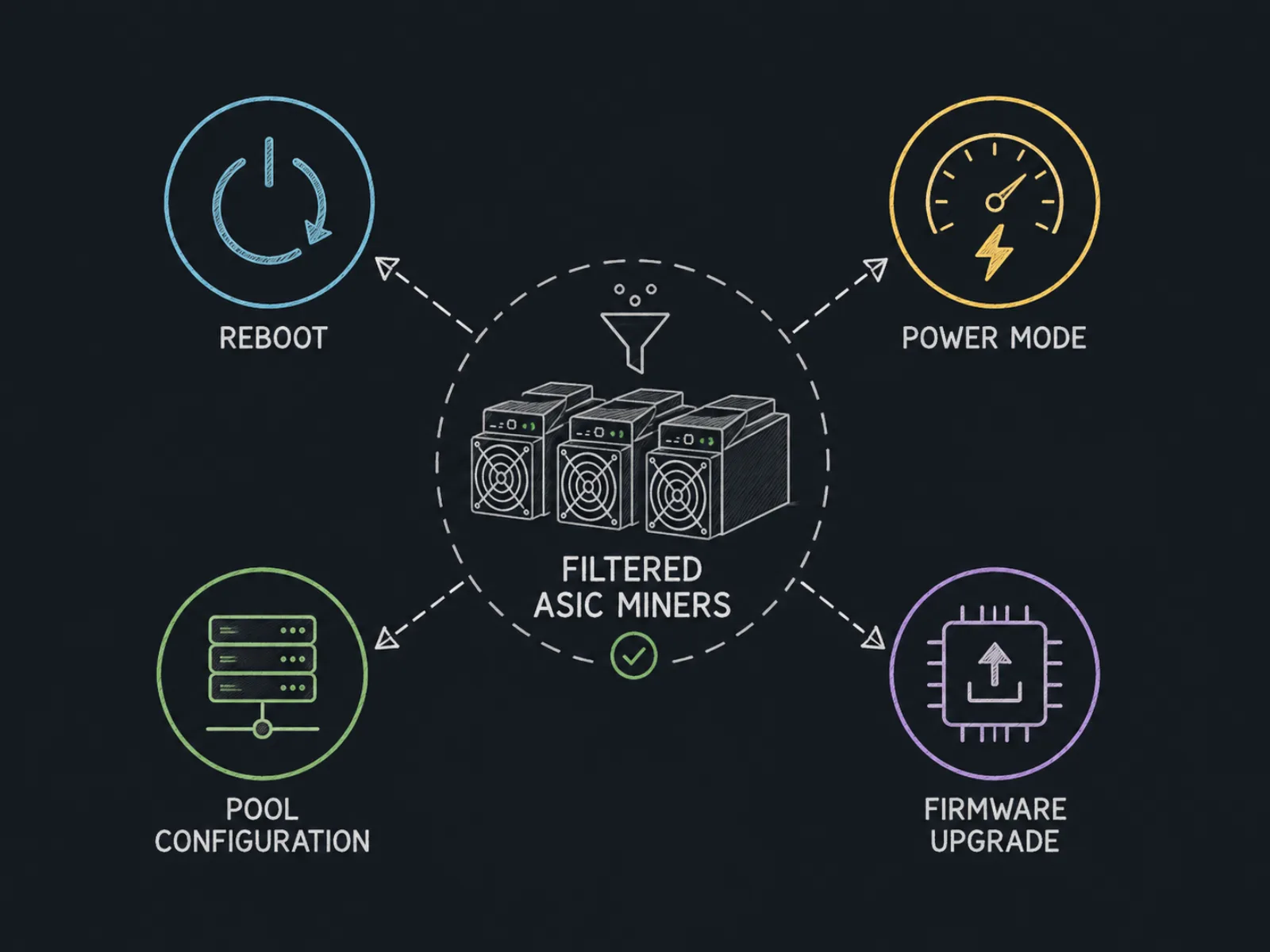
Only after anomaly filtering do you enter true bulk operations. Nonce's daily ops flow itself is organized around "query miners → select targets → execute action → review task results."
The most typical action is bulk reboot. When a group of miners suddenly drops hashrate, shows abnormal status, or fails to recover normally after a firmware upgrade, you can filter the target devices first, then reboot the selected miners without opening each miner's web UI one by one. Nonce supports bulk reboot on selected miners.
The second high-frequency action is bulk power-mode adjustment. Different operating modes are essentially a rebalancing among hashrate, power draw, temperature, and stability. Nonce can switch target miners in bulk among overclock, normal, underclock, and sleep modes. For example, in a high-temperature environment you can move a batch from high-power states to normal or lower-power states; during high electricity prices, curtailment, or planned downtime, you can also adjust operating status for a specified range of devices. Related actions can be done via bulk power mode.
The third action is bulk pool changes. On large farms, changing pool addresses and worker names machine by machine is not only slow—it also easily leaves config gaps. Nonce can set primary and backup pool info uniformly on selected miners to complete a batch pool switch. Bitmain's S21 user manual also shows that miners themselves typically need pool address and worker name configuration—exactly the kind of config a cluster management layer should handle uniformly.
Firmware upgrades need more caution. Nonce supports bulk miner firmware upgrades, but large farms should not simply treat "bulk" as "upgrade every device at once." Bitmain's firmware upgrade notes also specifically remind operators to confirm firmware matches the miner model, and to watch whether existing pool and network settings are retained during upgrade. For production farms, the safer method is usually to test a small set of same-model devices first, confirm hashrate, temperature, pool connection, and stability are normal, then expand the upgrade scope.
Step 4: Turn Repetitive Manual Work into Automated Ops
Bulk operations solve "handling many miners at once"; automation solves "why does the same problem still need a human every day."
One of the most typical repetitive scenarios on large farms is low hashrate. Operators daily filter low-hashrate devices, check temperature, click reboot, then wait for recovery—this flow is well suited to rules. Nonce's low-hashrate auto reboot can compute average miner hashrate over a set time window and send a reboot task when a miner stays below a specified threshold; thresholds can be set uniformly or per miner model. The system also provides temperature protection, reboot interval, and reboot-count limits so abnormal devices do not enter endless reboot loops.
Those guardrails matter. "Low hashrate" is only an outcome—it does not mean "reboot will definitely fix it." If a miner underclocks due to sustained high temperature, or hardware itself has failed, continuous reboots will not solve the root cause. What large farms truly need is not simple auto-execution, but automation with boundary conditions: meet the hashrate condition, meet the temperature condition, and stay within action-frequency limits before an automatic action is allowed.
Temperature follows similar logic. Nonce can automatically adjust miner operating mode based on average temperature over a period. When temperature hits the set condition, operating intensity is reduced; after temperature recovers, the corresponding mode can be restored by rule, with execution-frequency limits to avoid frequent switching near critical temperatures.
In addition, for clear manual-ops scenarios such as peak shaving, curtailment, and maintenance windows, you can use quick actions to switch all miners or devices in a specified IP range to sleep mode, then switch back to normal when conditions recover. The difference from automation rules: quick actions are triggered once by a person, while automation rules continuously evaluate set conditions.
Farm ops then changes: operators no longer personally complete every reboot and mode change; they more often define what counts as abnormal, which devices can be auto-handled, and after how many automatic attempts a case should escalate to manual inspection.
The "Filter — Bulk — Automate — Verify" Loop
Using farm management software does not mean every device should be controlled uniformly. On the contrary, the larger the scale, the more bulk actions need scoped control.
For example, to change S21 operating mode, first filter the matching model and target zone, then confirm current device status; for firmware upgrades, classify by miner model and existing firmware; for overheating devices, first filter miners that truly exceed the temperature condition—not adjust the whole farm because one rack ran hot.
A more mature operating pattern can be summarized as:
Monitor to discover anomalies → locate devices with conditions → confirm which anomaly class it belongs to → choose the matching bulk action → review task execution results → check whether hashrate and status recovered → build automation rules for recurring problems.
The final "verify" step is often overlooked, yet it is a key distinction between bulk management and a real ops system. Sending a reboot task does not mean the problem is solved; a successful pool config change does not mean the miner has resumed normal hashrate submission. Farms should re-check online status, actual hashrate, temperature, and pool connection, then filter still-unrecovered miners into the next handling round.
For large teams, you also need to solve "who can operate which miners." Nonce's permission system can assign access by role and farm scope. For example, people who only view data need no device operation rights; members responsible for daily ops can run miner tasks; higher-risk action rights can be limited to higher roles. That avoids amplifying mis-operation risk when everyone has the same permissions.
The Core of Large ASIC Farm Operations
The ultimate goal of bulk ASIC management is not letting operators control more devices with one click—it is reducing how many devices the ops team must personally handle every day.
In the ideal state, most healthy miners should never enter an operator's view. The platform continuously collects device data and healthy devices keep running; only offline, zero-hashrate, low-hashrate, overheating, or otherwise actionable miners are filtered out. Devices that can recover via standard actions get bulk handling; rule-friendly problems go to automation; the small number that still cannot recover are handed to on-site staff to check hardware, power, network, and cooling.
That means as farm scale grows, ops efficiency should not simply depend on hiring more people. What truly needs to scale is device discovery, status monitoring, anomaly classification, bulk execution, automated recovery, and permission management.
Nonce puts these stages into one ASIC farm management flow: build a device view via Agent scanning and continuous collection, quickly find abnormal miners with multi-condition filters, then run bulk tasks such as reboot, power-mode adjustment, pool config, and firmware on target devices, and further automate recurring scenarios like low-hashrate reboot and temperature-driven operating-mode adjustment. For large Bitcoin farms, what this model truly changes is not how many clicks one action needs, but shifting daily ops from "find and fix miners one by one" toward "discover anomalies, bulk-handle anomalies, and continuously reduce the count of abnormal devices."
When a farm can do that, ASIC bulk management is no longer just a convenience feature—it becomes the foundation for keeping hashrate uptime high, cutting repetitive labor, and building a standardized ops system.