How to Migrate from Foreman/OBM to Nonce: A Multi-Farm Bitcoin Mining Operations Playbook
Migrating from OBM (formerly Foreman) to Nonce isn't a one-weekend job, but the path is clear. Setting up a farm in Nonce takes five steps; an experienced operator gets data flowing in about ten minutes. What consumes the calendar is what comes after — parallel reconciliation, rule migration, and history archival.
Migrating from OBM (formerly Foreman) to Nonce isn't a one-weekend job, but the path is clear. Setting up a farm in Nonce takes five steps; an experienced operator gets data flowing in about ten minutes.
What actually consumes the calendar is what comes after — parallel reconciliation, rule and permission migration, and history archival. Don't try to rush that part. Pace it to your fleet size.
Key Takeaways
- Setup is 5 steps: basic info → add miners → configure pool → install Agent → scan network
- Pricing transparency: Nonce is free up to 100 miners with a published curve; OBM Essential is $0.60/miner/month, Enterprise is contact-sales
- Audit posture: Nonce displays SOC 1 Type II on the homepage; OBM bundles SOC access inside the Enterprise tier
- Multi-farm view: Nonce is one screen, one row per farm; Foreman uses parent/child dashboards plus emailed CSVs
- What it doesn't replace: OBM Enterprise's Real-Time Settlements / Price Response Plus (only relevant if you participate in power markets)
Why migrate from Foreman/OBM to Nonce in 2026
Across the operators we talk to, three reasons come up over and over.
Pricing transparency. OBM Essential lists $0.60/miner/month per obm.io/pricing; Enterprise is contact-sales — you have to talk to a salesperson before you see a unit price. Nonce takes the other route: permanently free up to 100 miners, with the pricing page publishing the 1,000-miner monthly fee and the equivalent unit price at 150,000-miner scale (down to $0.17/miner/month). Nonce public pricing →
Audit-grade badge in public. Nonce displays SOC 1 Type II directly on the homepage. When a customer, risk officer, or hosting partner says "send me a screenshot," you open the homepage and screenshot it.
OBM bundles SOC 1 / SOC 2 / ISO 27001 access into the Security & Compliance module of its Enterprise tier. But Enterprise itself is contact-sales, and the public pricing page doesn't say whether that access is included in the headline number or a separate add-on. The homepage carries no badge.
Multi-farm management. This is the single most-cited reason from operators coming off Foreman.
Foreman is built for hosting providers — every site maps to a Client object, each running its own Pickaxe, and to see the detail you click into that client's sub-dashboard.
The parent dashboard's cross-site view is a single aggregate hashrate tile. Per-site electricity reports and profit reports get pushed by email as CSV attachments.
Nonce is more direct: in the Workspace, one row per farm, the Operations tab spreads uptime, theoretical hashrate, pool hashrate, and Agent hashrate across columns; the Finance tab spreads revenue, electricity cost, and gross margin across columns. Every farm's operational state and P&L on one screen.
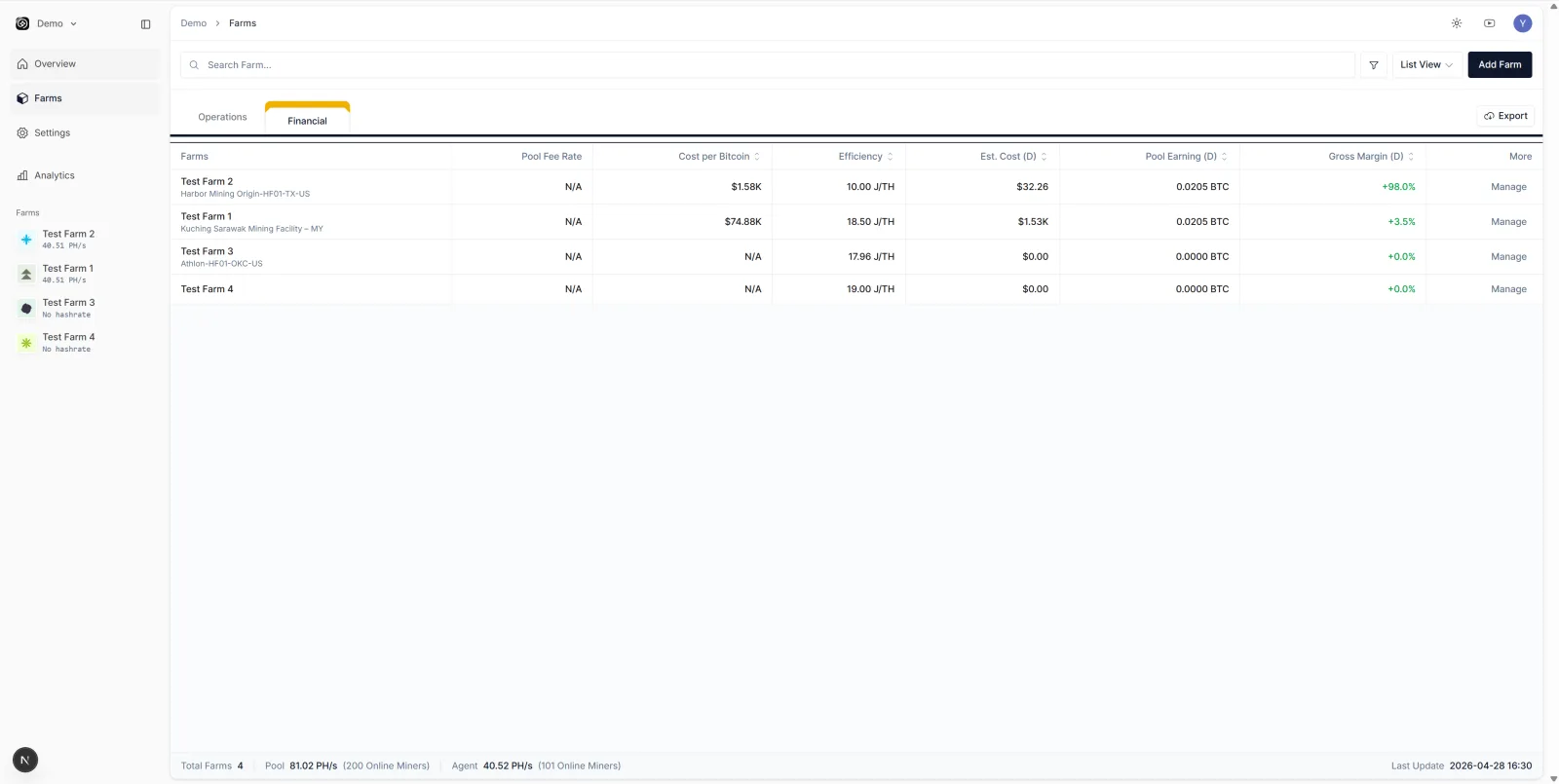
Scenario: three farms, end of month, who's actually making money?
A self-mining operator runs three farms — Test Farm 1, Test Farm 2, Test Farm 3 — each with a few dozen to a hundred miners. Power costs differ; the cheapest and the priciest sit at roughly 2× apart. End of month, one question: which farm earned the most this month?
In Foreman, the operator clicks into three sub-dashboards to read hashrate, then opens three profit-report emails, then pulls revenue and electricity into Excel one farm at a time. Half an hour later, gross margin emerges. In Nonce, the Workspace Finance tab is one row per farm; the gross-margin column answers the question directly: cheapest power, highest margin, which farm barely broke even. Where to move which batch of machines next month — that direction is sitting right there.
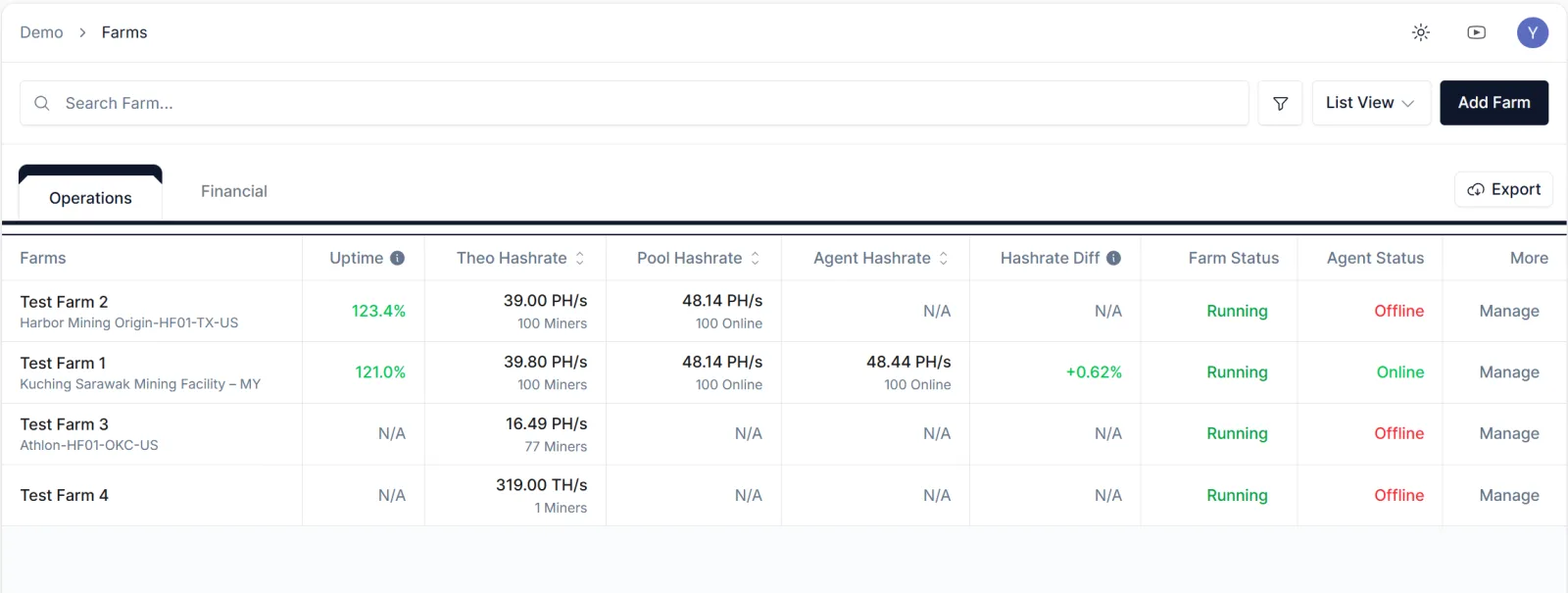
Setting up a farm in Nonce (five steps)
Prerequisite: a spare Linux host
The host running the Nonce Agent needs three things: a NUC or any machine with Linux installed, a static IP, and network access into the farm subnet.
Step 1: enter basic information
Fill out the farm basics: farm name and region are required; electricity cost ($/kWh), maintenance fee, and tags are optional. Nonce uses these to estimate the farm's timezone and electricity curve, which feeds the projected electricity cost and gets cross-checked later against Agent and pool data.
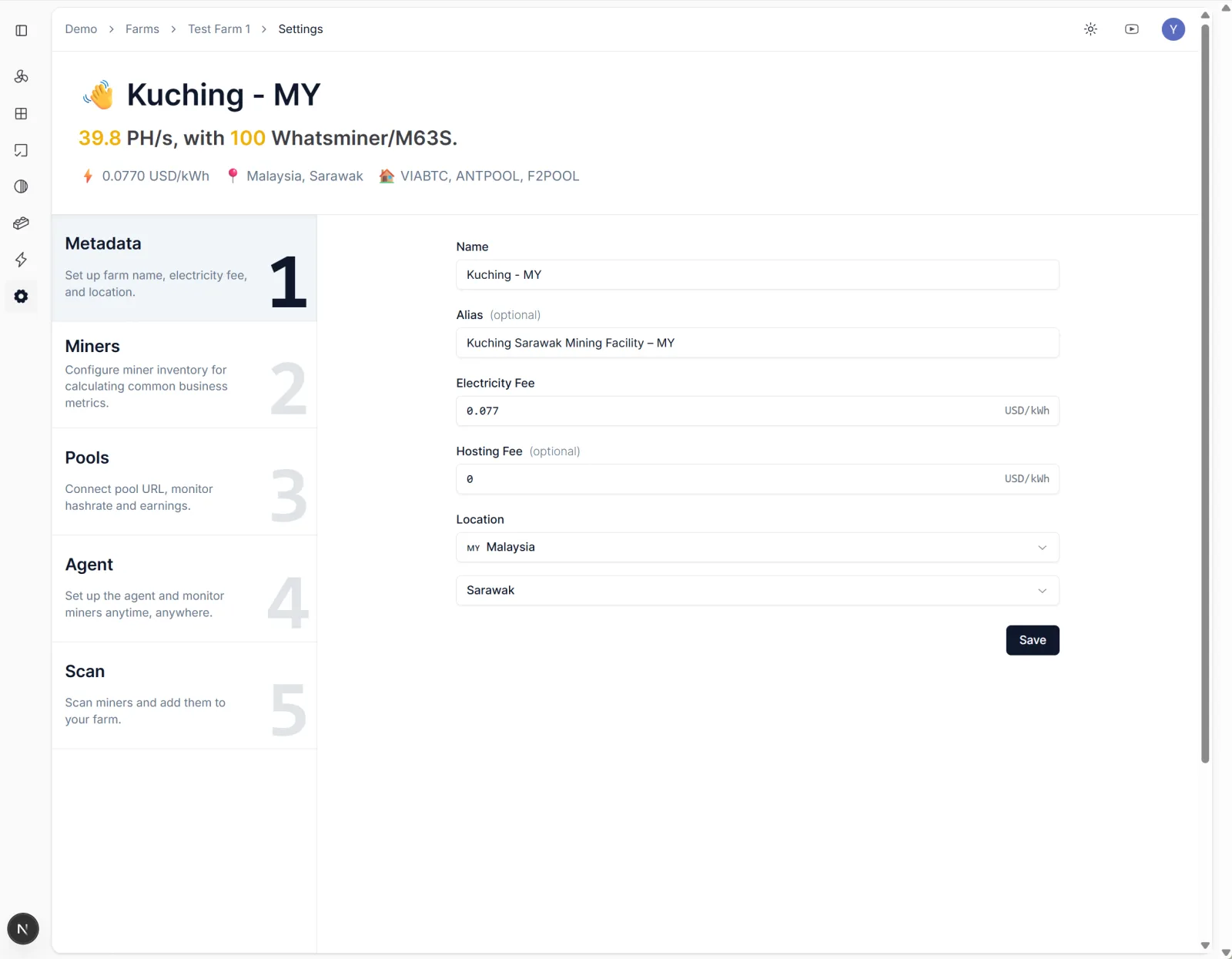
Step 2: add miners
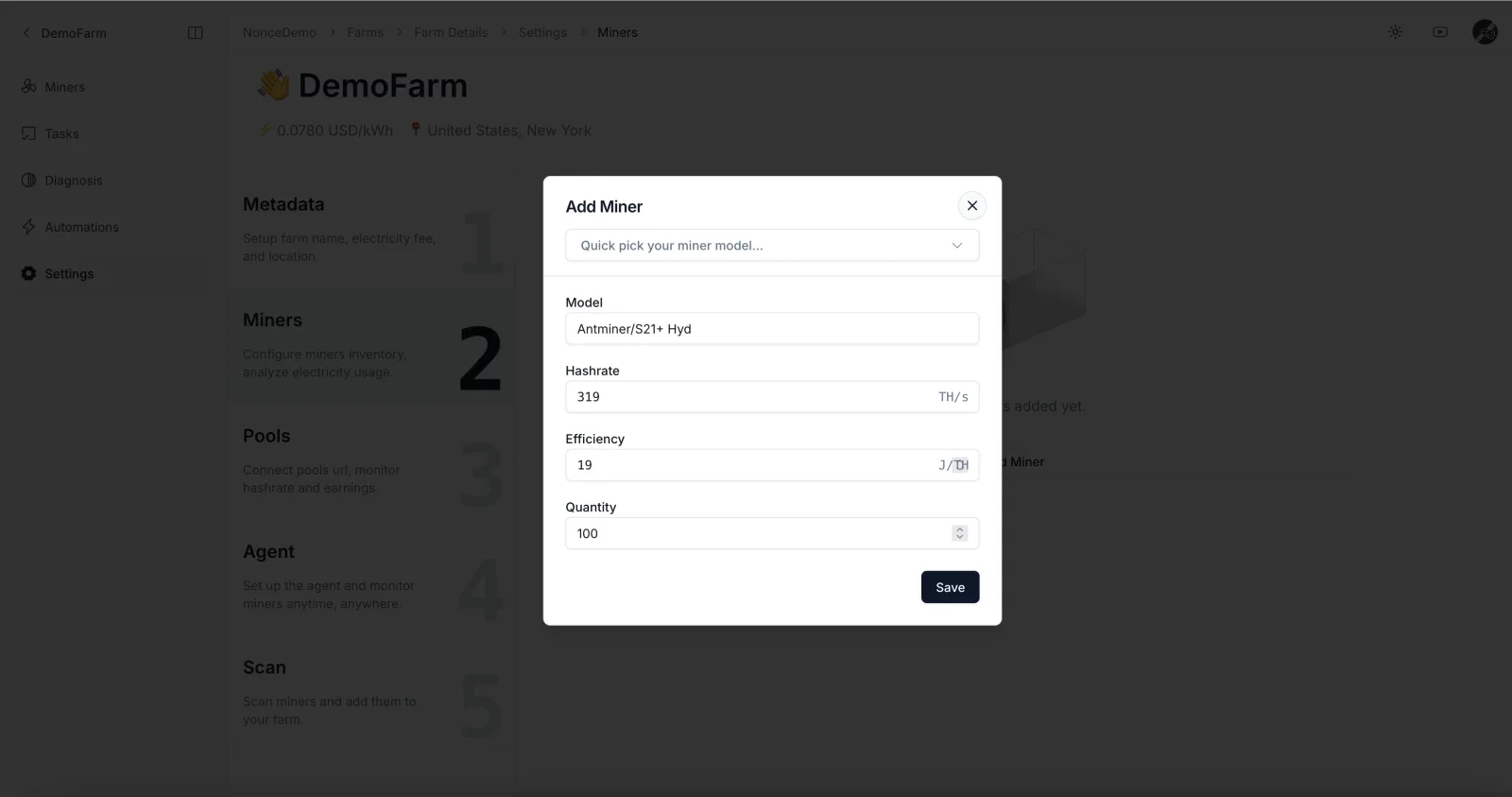
Pick miner model and quantity: choose model from the dropdown, enter count, enter efficiency in J/TH (e.g., S19 Pro = 34 J/TH). This builds the "inventory ledger" — Nonce computes theoretical hashrate and theoretical miner count from this, then compares against what the Agent and pool actually find. Discrepancies in hashrate or miner count surface fast.
Step 3: configure the pool (optional)
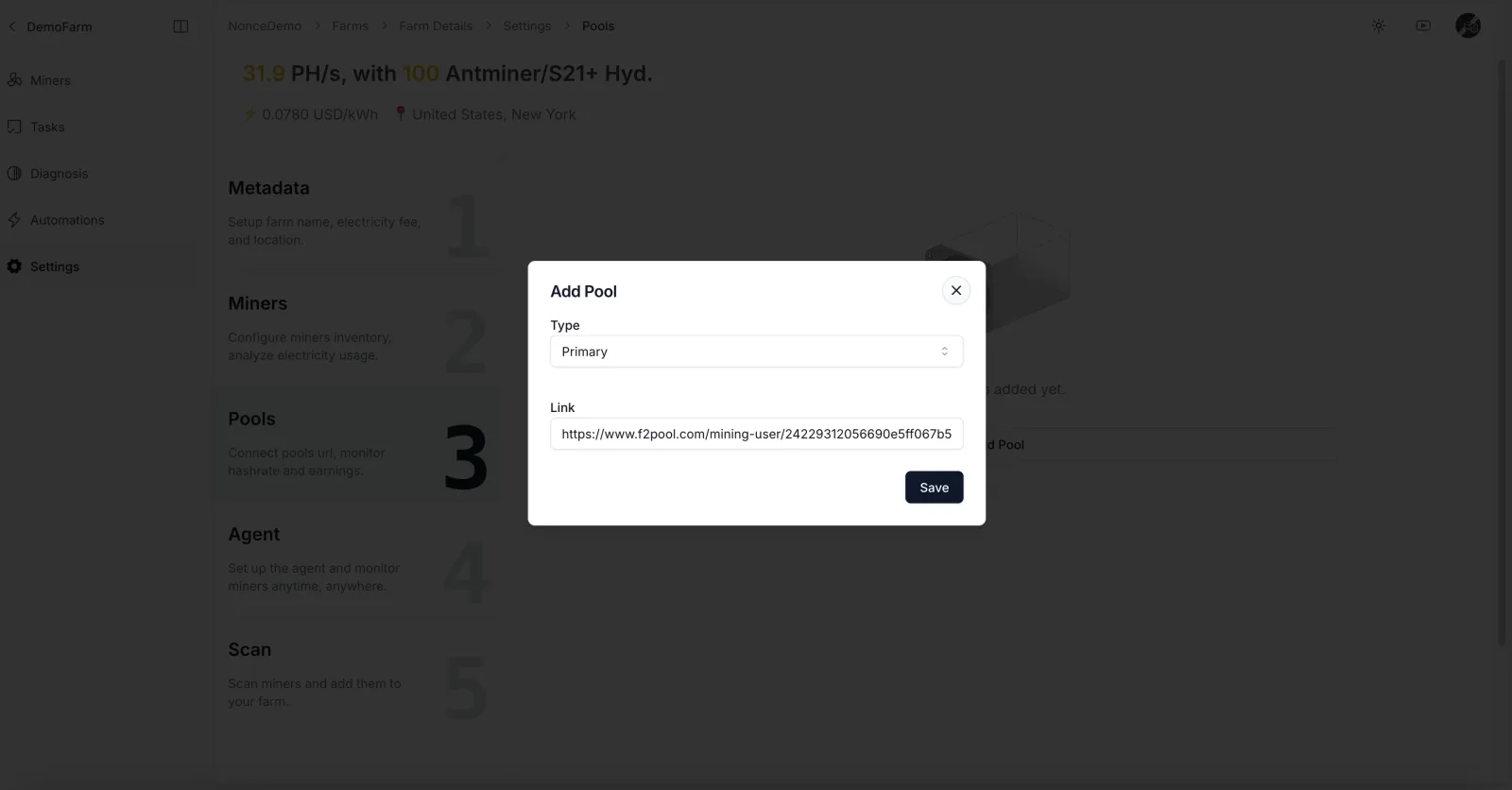
Add Pool Observer data: provide the Pool Observer URL and create the primary pool record. This connects Nonce to the pool-side hashrate ledger so pool-credited hashrate can be reconciled against firmware-aggregated hashrate. Foreman doesn't do this layer of reconciliation — to chase stale shares, you SSH into miners one at a time.
Step 4: install the Nonce Agent
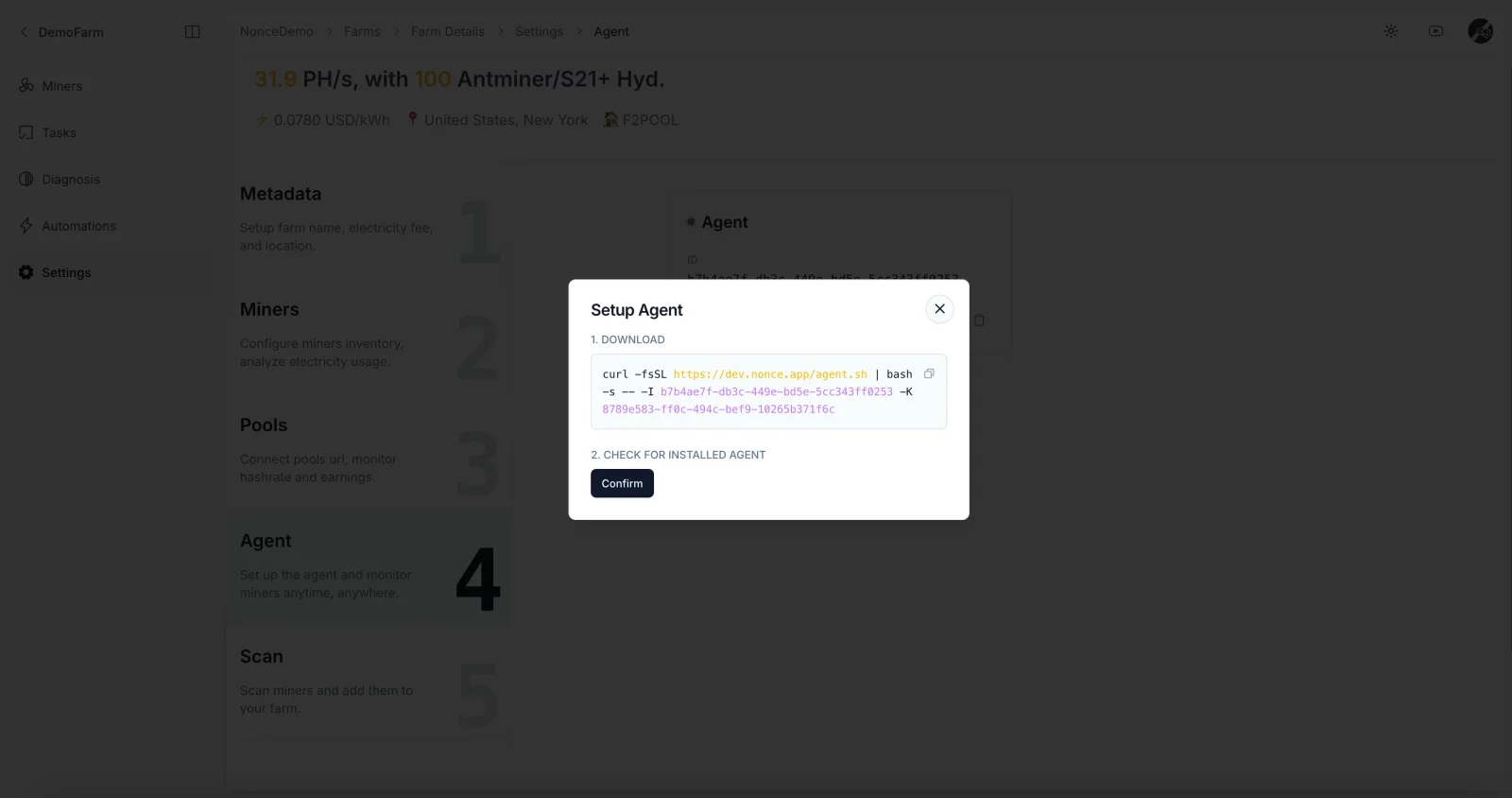
Copy the shell command Nonce generates, and run it on a server or PC that can reach the miners over the network (see Install the Nonce Agent).
Step 5: scan the network to discover miners
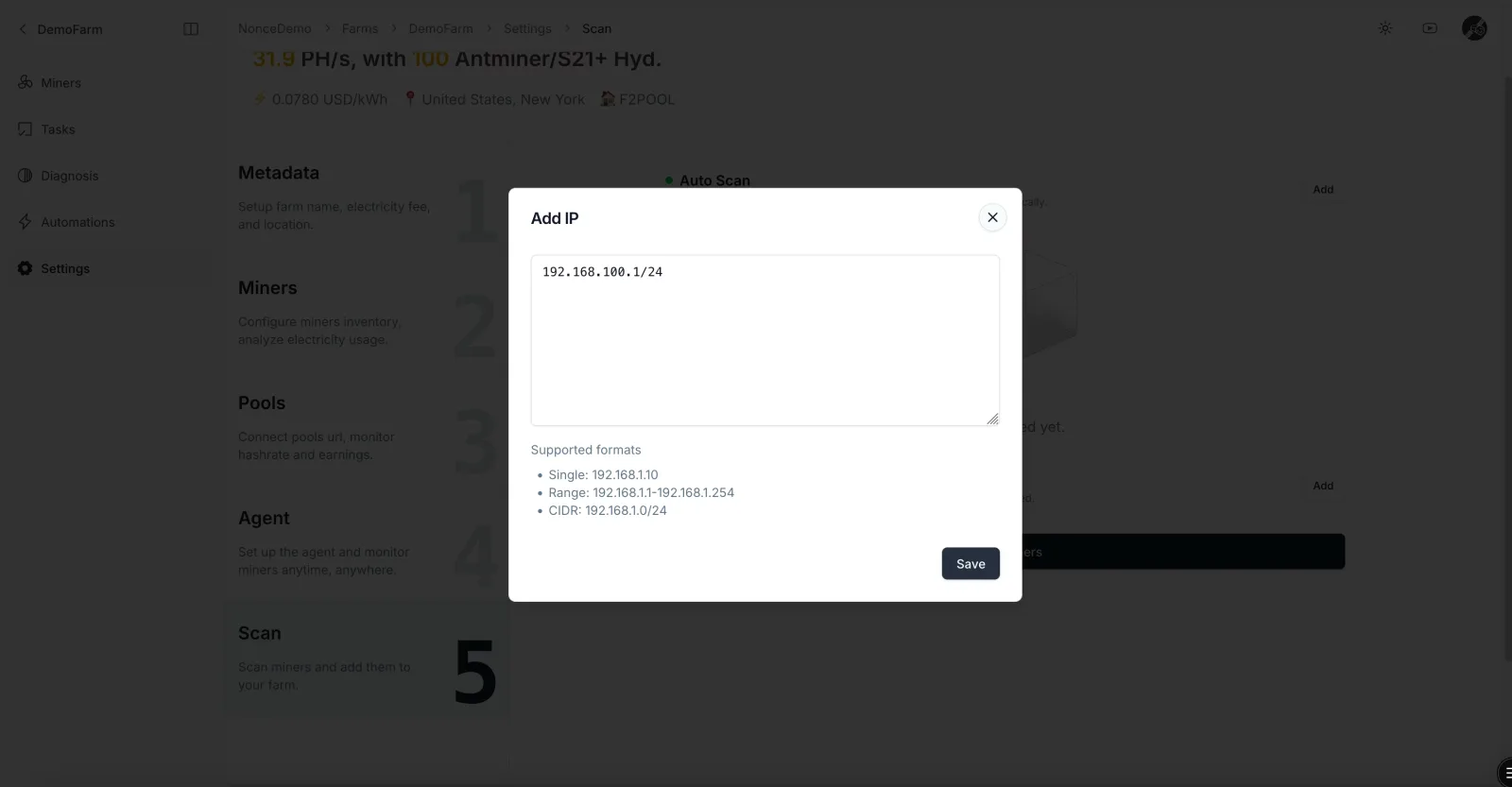
Add the IP ranges to scan; the Agent scans by IP and assigns newly discovered miners to the matching farm (see Scan the network to discover miners). Once the scan completes, the farm list and farm detail pages populate with hashrate, temperature, fan, pool, and power-draw data.
That's it — your farm is live in Nonce. The Nonce Agent is read-only, so running both systems in parallel doesn't conflict. If miner counts don't add up, nine times out of ten the Agent is missing an IP range, or Foreman still has a decommissioned miner on its books.
Parallel run + hashrate reconciliation
Once the Pool Observer URL is listening, Nonce cross-checks miner-reported hashrate against what the pool credits. On a healthy farm the pool-side and Agent-side hashrate should sit within 1–2% of each other.
During the parallel period, line up Foreman's headline numbers (uptime, hashrate, fan-abnormal count) against Nonce's for 5 to 7 days.
Migrate automation rules and role permissions
Move Foreman's operational rules into Nonce's day-to-day operations. Most rules carry over one-for-one — temperature thresholds, hashrate floors, offline-duration thresholds. Two patterns we see on production farms:
temp > 52°C → switch from overclock to normal mode(see overclock/underclock)hashrate < 200 TH/s → reboot miner
Hand the repetitive work to the system, drop manual round-the-fleet checks. Automation can switch power modes (overclock, underclock, normal) based on miner state.
While you're there, configure role-based permissions. Four roles (Admin, Manager, Member, Viewer) plus farm-level scope cover most real setups. Hosting providers give each customer Member access scoped to their miners only; an external auditor gets Viewer on the relevant farm for the audit window, then revoked.
Run both systems' alerts in parallel for a few days. Once the same miner triggers the same event in both Foreman and Nonce, the migration is technically done. What's left is history archival and cleanup.
Archive Foreman history, close the OBM subscription
Don't delete Foreman's action history yet — export it (admin export from the dashboard, or via the OBM API) and ship it to long-life cold storage (S3 Glacier, on-prem NAS, whatever your finance team uses). Audit trails, tax season, and internal-dispute lookups can call on this any time over the next year or two.
After all automation rules and alerts have moved to Nonce, leave Foreman read-only for another week or two. If a rule turns out not to have been migrated cleanly, or a role permission was missed, comparing against the live Foreman state is faster than reconstructing it from memory.
When everything's stable, note the billing-cycle date (OBM bills monthly — clearing the renewal window saves a month) and cancel the subscription. Before you decommission the Foreman account, run one last export to confirm no report data is left behind.
What Foreman doesn't have: Nonce Diagnosis, one-click health check
Nonce consolidates the scattered diagnostic checks into a single Diagnosis page — one click to run a health check across the farm.
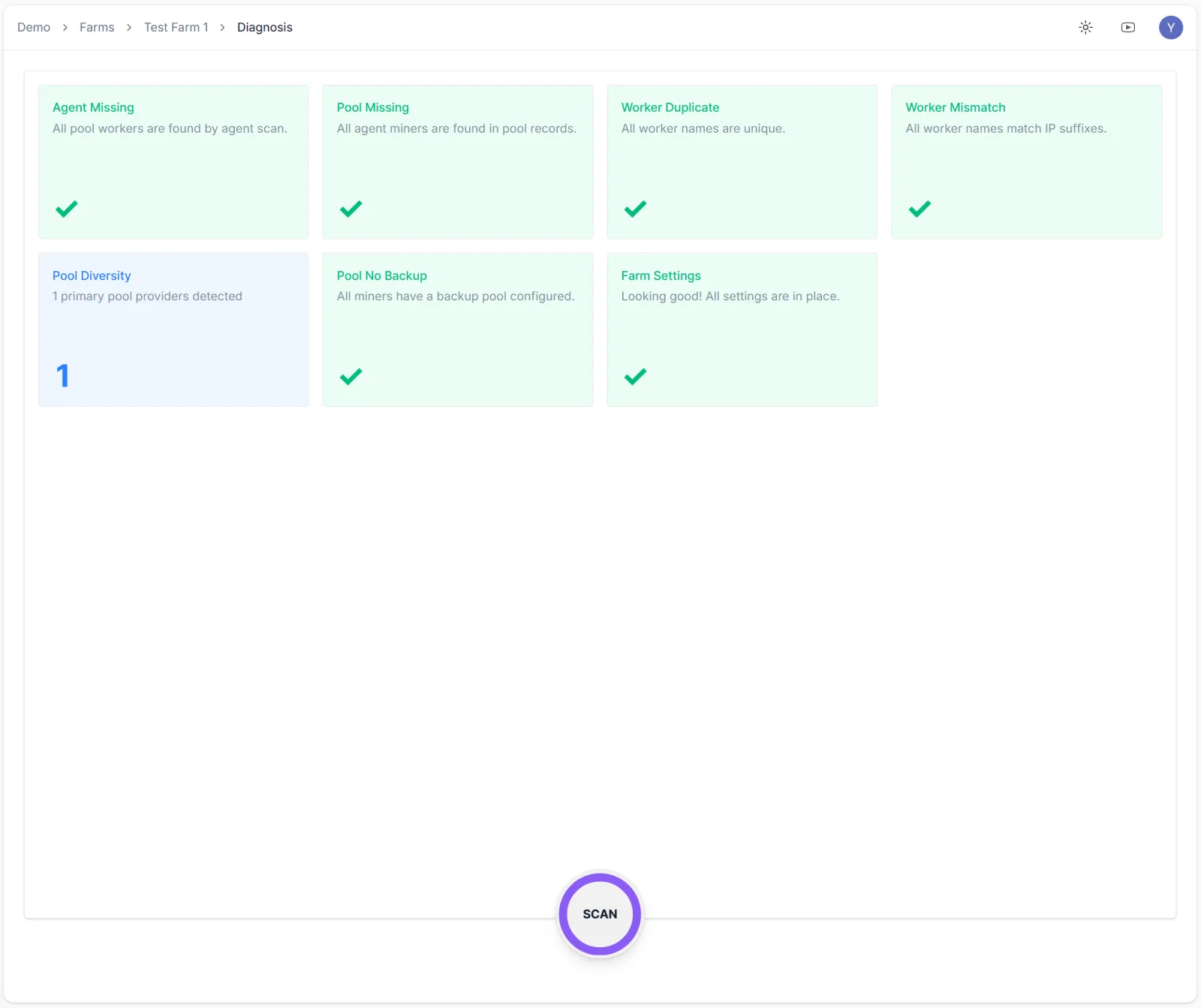
- Agent Missing — miners visible to the pool that the Agent can't see. Nine times out of ten an IP range is missing from the scan list, or a miner moved subnets without anyone updating Nonce.
- Pool Missing — miners the Agent finds, but the pool isn't crediting. Check the miner-side pool address first; it's either a typo or someone quietly switched it to a backup pool.
- Worker Duplicate — duplicate worker names. Common after bulk firmware reflashes when the naming convention slips, two machines fight for the same name, the pool only counts one.
- Worker Mismatch — worker name doesn't match the IP suffix. Happens after rack moves or relocations when the label didn't get updated. Painful to debug later.
- Pool Diversity — number of distinct primary pools the farm is using. Greater than 1 is usually a config-drift signal (factory reset, an incomplete pool change), needs human judgment on whether it's intentional or a mistake.
- Pool No Backup — flags whether a backup pool is configured. Without one, a primary-pool outage drops revenue to zero.
- Farm Settings — checks whether farm-level parameters are filled in (electricity rate, timezone, alert recipients). Miss any and downstream features (Energy, profit calculation, alerts) silently fail.
Want to see Diagnosis on a real farm? Sign in and open the Diagnosis view on our demo farm — any signed-in Nonce user can see it without a separate permission grant.
Migration-complete checklist
Before calling the migration done, walk through the six items below:
- Three core numbers (uptime / hashrate / fan-abnormal count) reconciled with Foreman for ≥ 5 days
- Same miner, same event, alert fires in both Nonce and Foreman
- Foreman action history exported to long-life cold storage
- Finance and external-audit reports now sourced from Nonce
- Automation rules have run for ≥ 3 days;
triggeredcounts match expectation - Diagnosis view confirms no outstanding anomalies
Six checks pass — Foreman can be shut off completely.
What you keep, what you drop
The question we hear most is "Can Nonce fully replace OBM?" The honest answer splits in two: for fleet management, mostly yes; for power-market participation, depends on how you make money. The table below lays out the six dimensions we get asked about most. Start there.
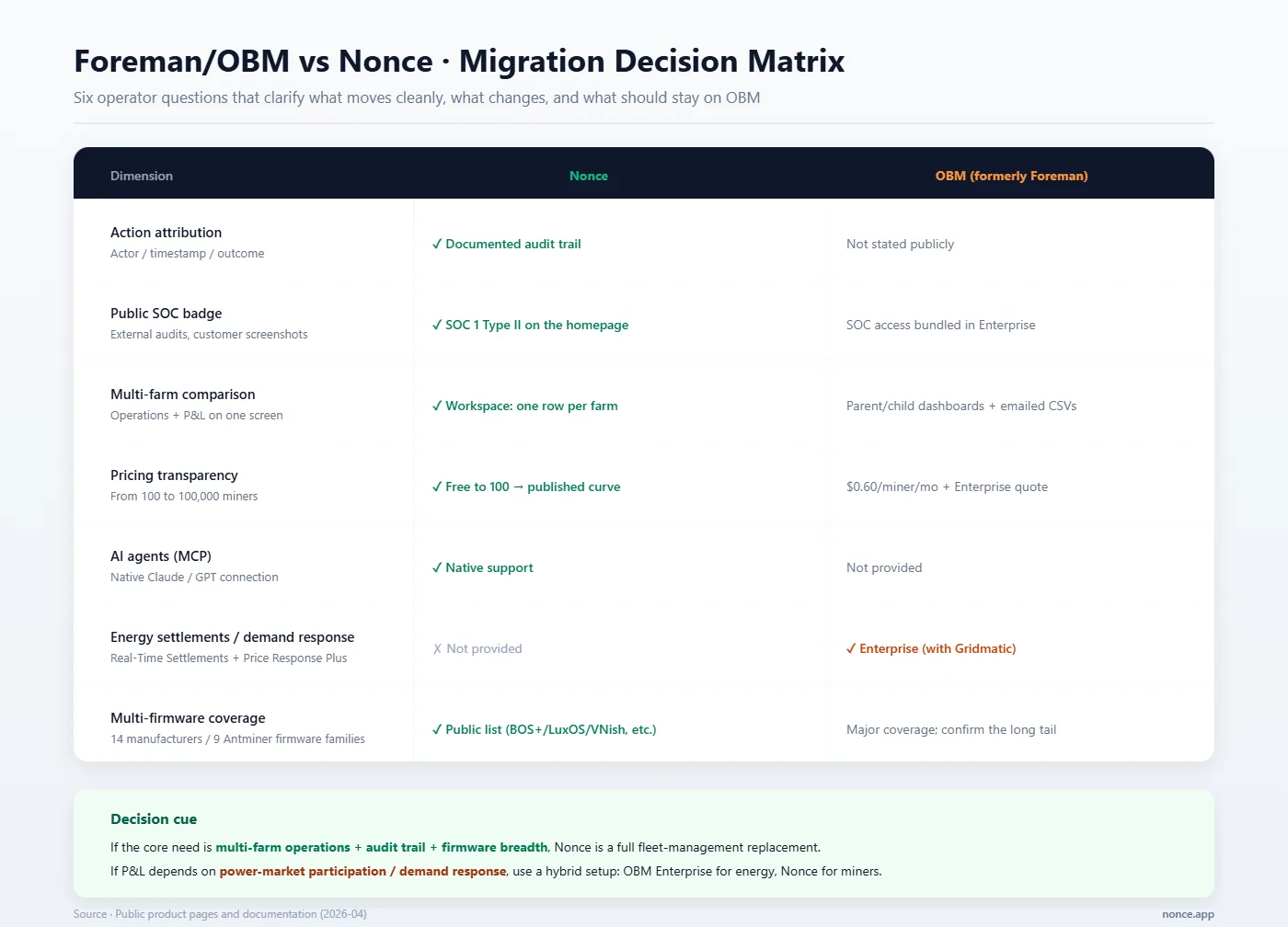
A few secondary differences sit beneath the main table — worth knowing before you migrate:
- Multi-firmware coverage — Nonce publicly documents 14 manufacturers and 9 Antminer firmware families (BOS+, LuxOS, VNish, MaraFW, HashMaster, BitFuFuOS, ePIC, Hive, Stock). If something obscure runs in your inventory, check the supported list before cutover.
If your P&L hangs on ancillary-services revenue or grid dispatch, don't migrate fully. The honest setup is hybrid: keep OBM Enterprise running the energy side, let Nonce take over fleet monitoring and operations. Both systems read the same miners with no network-layer conflict and no operational side effects.
FAQ
Is Nonce a Foreman alternative?
For fleet monitoring, automation, attribution, multi-firmware coverage, and electricity reporting — yes, basically one-for-one. OBM's energy products (Real-Time Settlements, Price Response Plus) don't have a direct Nonce equivalent. So the call is straightforward: pure fleet management plus electricity accounting → migration is clean. Grid-settlement revenue is part of your model → see the hybrid setup in "What you keep, what you drop."
How long does migrating from OBM to Nonce take?
Setting up a farm in Nonce takes five steps and about ten minutes for an experienced operator to get data flowing. The clock isn't the configuration — it's everything after: parallel reconciliation with Foreman, migrating rules and permissions, archival. For fleets above 100,000 miners, two to three weeks of parallel verification is standard. Don't skip it.
Will I lose historical data after leaving Foreman?
Export Foreman's action history before you cancel — admin-side export, or via the OBM API — and move it to long-life storage. Nonce starts logging actor / timestamp / outcome from the moment the Agent comes online. The two histories don't merge, but both stay accessible. If something needs forensic lookup later, query each separately.
Does Nonce support as many firmware families as Foreman?
Both cover the major manufacturers and firmware families; the difference is in the long tail. Nonce publicly documents 14 manufacturers and 9 Antminer firmware families — the full list lives in Supported miners and firmware. If something obscure runs in your inventory, check that page before cutover.
Is Nonce SOC 2 certified?
Not SOC 2 — SOC 1 Type II. Both are valid third-party audit standards but the focus is different: SOC 1 is financial-controls-oriented, SOC 2 is data-security-oriented. Don't conflate the names in finance, risk, or hosting conversations — say the full one. It saves a lot of follow-up.
Closing
Migrating from Foreman to Nonce has no flashy shortcut, but the path is clear: configure each farm in Nonce in five steps, run parallel with Foreman for a week or two, move the rules and permissions, archive history, cancel the subscription. Done.
The first 100 miners are permanently free — enough to pilot a sub-fleet first. Try the multi-farm view, run the Diagnosis health check, see whether the automation rules behave as expected. Once it feels right, decide whether to bring the rest over.